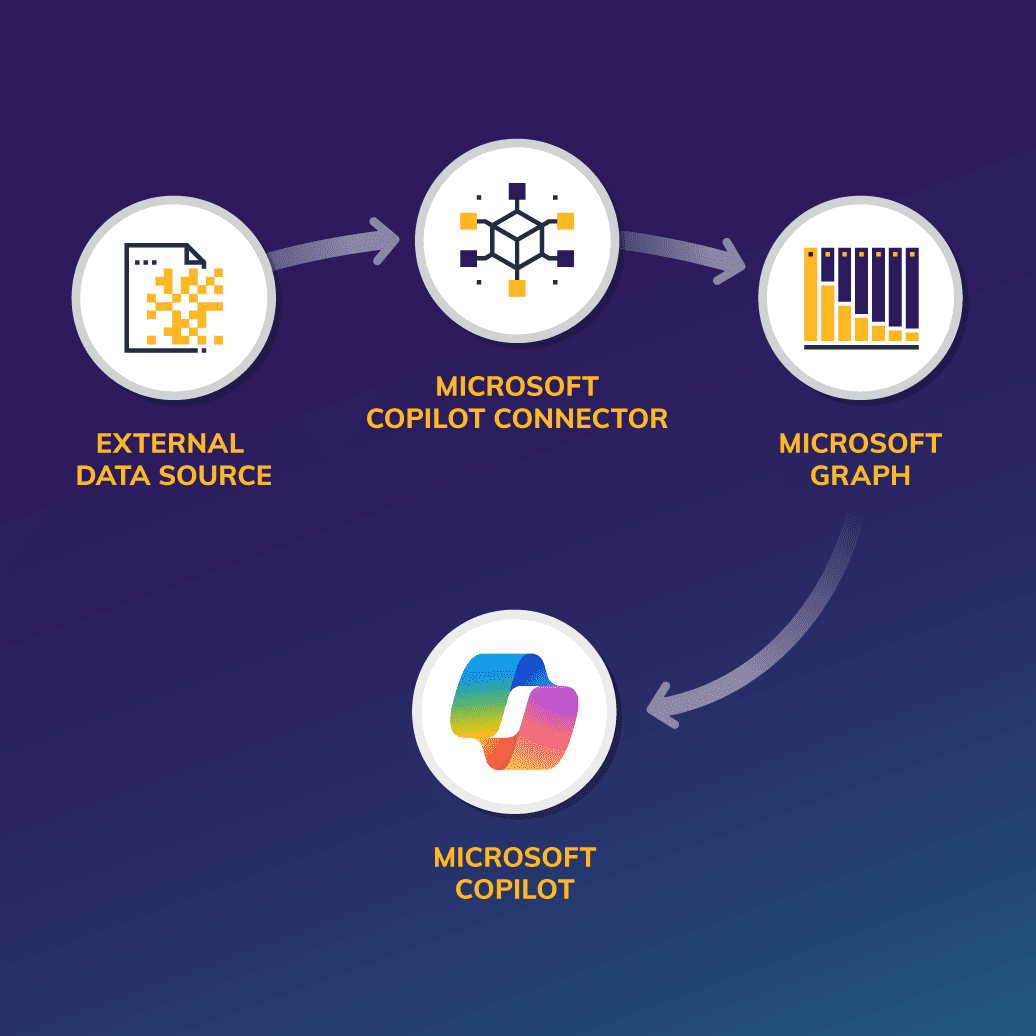
Microsoft has powerful, multicloud integration capabilities, including Microsoft Copilot connectors. Connectors extend Microsoft Copilot’s reach to wherever you store your data, whether it’s in the Microsoft Azure Cloud or not. That makes Copilot your natural language tool for querying all your data.
In brief:
- Microsoft Copilot connectors let Copilot access data stored anywhere, from Salesforce to ServiceNow to custom databases, so you can search all your company information using simple, natural language queries.
- Microsoft Graph organizes and indexes data from multiple sources, helping Copilot understand context and deliver smarter answers while keeping security permissions intact.
- There are about 100 prebuilt Copilot connectors ready to use, and you can build custom ones to connect your unique systems.
- By connecting all your business data through Microsoft Graph Copilot, teams get faster answers, collaborate better across platforms, and waste less time hunting for information.
The power of artificial intelligence (AI) lies in the data it accesses to generate results. However, while Microsoft Copilot is designed to pull data from across the Microsoft 365 suite, many organizations store critical information in additional cloud environments, such as Salesforce. Still, they rely on Microsoft Copilot for enterprisewide data search and insights.
How do they do it?
The answer is Microsoft’s robust, multicloud integration capabilities.
“Microsoft is a leader in several cloud service domains, especially regarding integration with other tools and security and compliance,” says Centric Consulting’s National Microsoft Cloud Practice Lead Karina Myers. “It holds a 20 percent share of the worldwide cloud infrastructure market, second only to Amazon Web Services. As a major player in the cloud migration boom, Microsoft has contributed a tremendous amount of innovation to cloud operations.”
One of those integration capabilities is Microsoft Copilot connectors, Microsoft’s platform for collecting and adding all your business data to Microsoft Graph.
In this blog post, we’ll explain how Microsoft Graph and Microsoft Copilot connectors work together to give your employees access to all enterprise data through Microsoft Copilot. We’ll also explore use cases for these connectors and how you can use them to unlock the full power of Copilot in your Microsoft suite.
What Is Microsoft Graph?
Think of Microsoft Graph as a bridge that connects business data to various apps. It uses a semantic index to place the data in its proper context to match queries. It then connects data directly to applications in the Microsoft 365 suite, such as Microsoft Search, Context IQ, and Microsoft 365 Copilot.
Graph uses various plug-ins and Copilot extensions to complete this important task, making connectors and Graph essential resources for analyzing your data for comprehensive, accurate results.
One of the integrations is Microsoft Copilot connectors. These connectors allow you to ingest unstructured line-of-business data from other cloud environments — such as Salesforce, Adobe, Slack, Google Workspace, and more — into Microsoft Graph. This lets Copilot access data from across your enterprise so it can provide better insights and answers.
Currently, about 100 prebuilt Microsoft Copilot connectors are available. These include both Microsoft applications and others, such as ServiceNow and Azure DevOps. You can also use application programming interfaces (APIs), Microsoft Power Platform, or the Microsoft 365 Agents Toolkit to build custom connectors.
The results are profound. By integrating data from across your company, connectors pull all your business-critical information together to answer prompts from across the enterprise, using all your enterprise data.
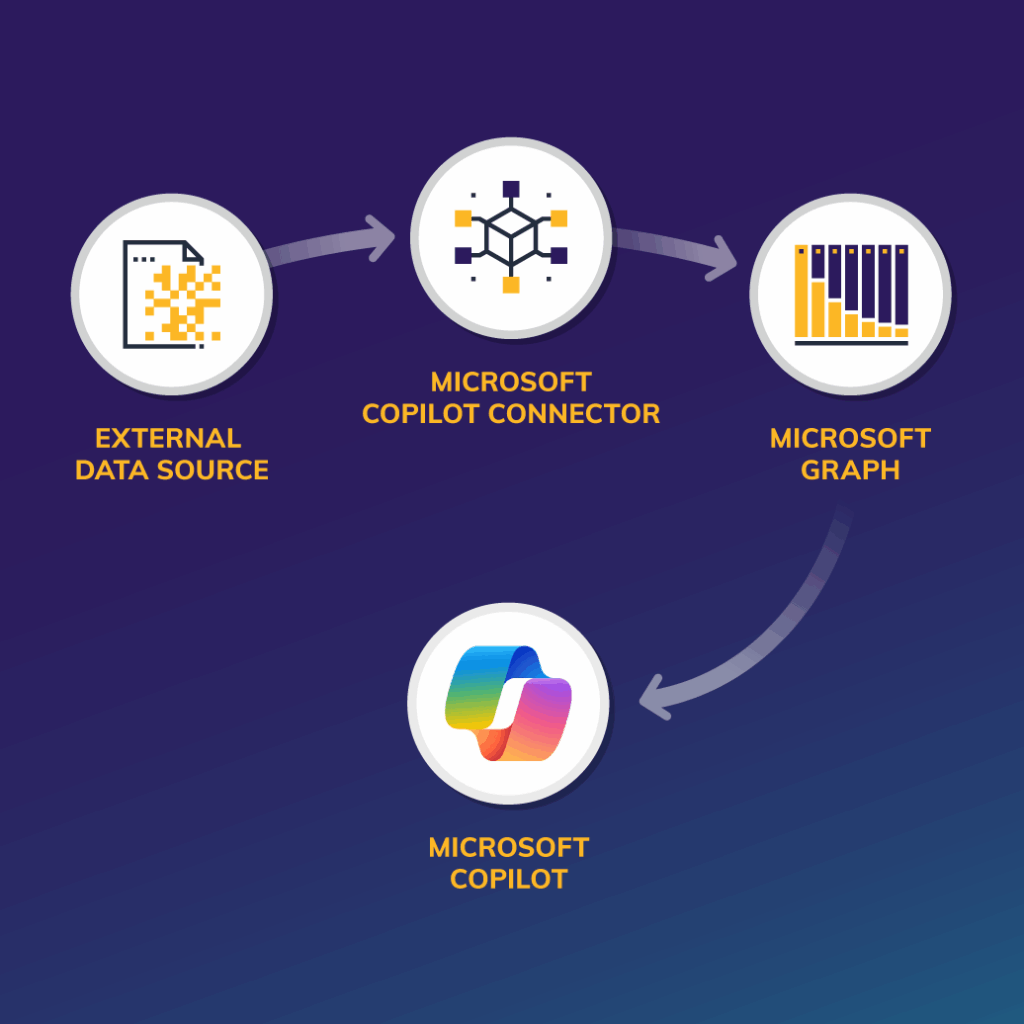
The Microsoft 365 Copilot Connectors Workflow
The Microsoft 365 Copilot connectors workflow begins with your external data. Connectors maintain permissions and authentication to securely transfer data and metadata into Microsoft Graph.
Once Graph semantically indexes the data, you have a unified schema for business data and contextual understanding instead of simple keyword matching. In addition, Graph continues to maintain permissions and authentication to ensure that only authorized users can see it. For instance, the connectors bring content from services such as OneDrive, Outlook, Gmail, Google Drive, and Google Calendar into Copilot, making collaboration easier across platforms.
Microsoft Copilot then uses the indexed data to provide inline references back to the system and generate contextual answers from connected data sources. Because Copilot has access to both internal and external data, productivity increases. Let’s explore this and other benefits of using Copilot connectors.
The Benefits of Microsoft Copilot Connectors
The many benefits of using Microsoft Copilot connectors include:
- Unified Knowledge Access: Connectors add the data from multiple external systems (Salesforce, ServiceNow, Jira, databases, and so on) into Microsoft Graph and displays all organizational data in one place.
- Context-Aware Response: Copilot fetches data related to the current context, making the result more accurate than a keyword-based system. It can then explain and summarize the result.
- Artificial Intelligence (AI)-Powered Contextual Search: Connectors enable natural language queries instead of complex searches.
- Intact Permissions: Since connectors respect existing permissions, users view the data according to their assigned permissions.
- Better Flexibility: Through the Graph API, connectors support custom integrations with proprietary systems.
- Increased Productivity: Connectors enable Copilot to directly display the result inside Teams, Outlook, Word, Excel and so on, saving time on app switching.
Limitations of Microsoft Copilot Connector
The limitations of Microsoft Copilot connectors include:
- Performance: Large data sets take a long time to index.
- Sync Limitations: Not all connectors sync data in real time, and some connectors can sync data only after a specific period.
- Editing Restrictions: After deployment, configurations cannot be changed for some connectors. For those connectors, configurations must be recreated after old configurations have been deleted and changes deployed.
- Connector Availability: Creating custom connectors takes time.
- Cost: Developing and maintaining custom connectors is costly.
- Complex Setup: Because of their complexity, connector configurations require admin expertise.
- Licensing: Some connectors require higher-level Microsoft 365 licenses.
- Maintenance: Updating connectors for changes in external systems requires continuous management.
Use Case: IT Service Management With Jira
One of the key use cases for Copilot connector is in information technology (IT) service management (ITSM) using Jira.
Imagine an IT team that manages its services with Jira, where each task is tracked as a “ticket.” Previously, developers had to manually search for tickets in Jira and then switch to their coding environment, such as Visual Studio Code, to work on them. This constant switching often disrupted their focus and consumed valuable time.
With the introduction of Copilot, Jira data is now integrated into Microsoft Graph through Copilot connectors. Copilot analyzes this data and allows developers to retrieve ticket information simply by writing natural language commands. Since Copilot can be integrated into any platform, developers can view and act on ticket details directly within their current workspace, streamlining the process and improving productivity.
For example, suppose an IT support engineer wants to access all open tickets in Jira. They can now use Copilot to see all open tickets.
To complete this task, Copilot connectors load all Jira content into Microsoft Graph. Microsoft Graph then indexes the Jira content. Once the IT support engineer asks Copilot to “Display all open tickets,” Copilot can read the indexed Jira data stored in Microsoft Graph, fetch all the open tickets data, along with a link, and display the result on the platform.
With this process:
- The IT support engineer doesn’t need to query Jira to fetch the data. Instead, they give Copilot a natural language command to generate the resulting list of all open tickets.
- The engineer doesn’t need to switch between Jira and a working tool such as Visual Studio Code or Visual Studio to see tickets. Jira allows them to see Jira information within the working tool, increasing their concentration level.
- Upper management can also use Microsoft 365 applications to track the status of Jira tickets.
The result is faster resolution of open tickets and higher user satisfaction.
Other Microsoft 365 Copilot Connectors Use Cases
Microsoft Copilot connectors have countless other use cases, such as knowledge base and documentation or asset and inventory management.
For knowledge base and documentation, imagine an IT team tasked with maintaining technical guides and knowledge base articles across multiple platforms, such as an external wiki portal and the company’s internal Microsoft SharePoint repository.
Connectors can access and analyze all the data, even from wiki, and move it into Microsoft Graph. Graph then indexes the data and makes it accessible to Copilot.
Now, team members can simply use a natural language query, such as, “How do we configure VPN access for contractors?” Copilot gathers the data from Graph and compiles it for the team, which now has a centralized knowledge base that includes information that Copilot would not have access to otherwise.
For asset and inventory management, think of a team of IT admins responsible for tracking servers, licenses, and device inventories in a configuration management database (CMDB). In this scenario, Microsoft 365 Copilot connectors sync the CMDB data with Microsoft Graph.
To access the data, a team member only needs to ask Copilot a question, such as, “Which licenses are due for renewal this week?” Copilot fetches the information and presents it to the user.
In this use case, the team benefits from simplified IT asset tracking, patch management, license renewals and more.
Get More Out of Copilot With Microsoft Copilot Connectors
Microsoft Copilot connectors play a pivotal role in extending Copilot’s capabilities. They unlock the full potential of generative AI in the enterprise by seamlessly integrating external data into Microsoft 365.
By using this data, businesses can deliver intelligent, context-aware assistance to employees, resulting in higher productivity, faster decision-making, and streamlined workflows.
Microsoft recently changed its licensing model for those who can access Copilot for M365, opening it up to more businesses and individual users. Learn what this means for you.
Do you want to fully tap into all Microsoft Copilot has to offer? Our Modern Workplace experts can guide you through best practices to make your collaboration efforts seamless. Talk to an expert