
Consulting Magazine Names Danielle Maldonado a Diversity Champion in 2026 Women Leaders in Consulting Awards
Centric’s Danielle Maldonado named a Diversity Champion in Consulting Magazine’s 2026 Women Leaders in Consulting awards.

Are you building artificial intelligence (AI) agents? If so, you may be building them on a separate track from your Microsoft rollout. That’s understandable. On the one hand, you’re pushing Copilot and Microsoft 365 (M365) adoption. On the other, you’re managing custom AI agent development — purpose-built agents for automation, modernization, and specialized workflows.
The good news is you can do both together.
But how? After all, these initiatives tend to live in different teams, move at different speeds, and rarely talk to each other. Still, Gartner predicted that 40 percent of enterprise applications would embed task-specific AI agents by the end of 2026, up from less than 5 percent in 2025. And that shift is already underway.
The question most teams aren’t asking is the one that matters most: How do you get the agents you’re building into the tools your people already use every day?
Since the explosion of large language models (LLMs), I have spent the last few years developing AI using all the available methods, from no-code to pro-code, that Microsoft has built into its now-unified AI platform.
In the early period, you could only use the OpenAI tools that Microsoft integrated into Azure. Today, things have changed dramatically. Microsoft now offers over 11,000 AI models to choose from and many ways to use them across the enterprise. As of Microsoft Ignite 2025, Microsoft has completely opened its doors and invited in AI agents from any system, anywhere around the world.
With this hands-on experience of building agents across the Microsoft AI continuum, I’ve identified 12 integration pathways for bringing outside agents into your Microsoft technology stack, or what the industry is increasingly calling “bring your own agent” (BYOA).
BYOA spans everything from no-code entry points to fully custom pro-code architectures. They’re not all created equal, and they’re not all meant for the same team. But they exist and they’re maturing fast. Knowing the landscape is the first step to making a smart decision about where to start.
The integration options are more mature than most teams realize, and the decision is more nuanced than most vendors let on. This blog post maps all 12 pathways and gives you a practical framework for choosing the right one.
Before choosing a BYOA pathway, consider a more fundamental question: Why bring your custom agents into the Microsoft ecosystem at all?
It’s a question worth sitting with, especially for teams that have already invested in building agents outside of Microsoft and aren’t eager to rebuild or rewrap what’s already working.
I see four concrete reasons to bring your own agents into your Microsoft tech stack:
If your agents live outside Microsoft, your users must go somewhere else to interact with them. Deploying agents into Copilot or Teams puts them where your people already spend their day, which is the difference between an agent that gets used and one that doesn’t.
Connecting an agent to a Word document, a SharePoint site, or enterprise systems, like data lakes or enterprise resource planning (ERPs) tools, is significantly harder from outside the Microsoft ecosystem than from within it.
Through what Microsoft calls the Activity Protocol, or the communication layer that connects M365 products, agents in the ecosystem can interact with the full suite of Microsoft tools natively. If your organization’s knowledge work happens in the Microsoft Office Suite, this matters more than you might realize.
Through Microsoft’s Model Context Protocol (MCP) tools, organizations can easily integrate AI with their existing enterprise systems, such as ERP, CRM, Fabric, Azure and much more.
Microsoft’s control plane is built around Microsoft Agent 365, with Entra for identity management, Purview for data governance, and Defender for threat protection. The control plane gives organizations a centralized way to manage who has access to agents, what those agents are doing, and how they behave.
The control plane is the foundation for building fair and transparent AI within the Microsoft ecosystem. Building that kind of oversight infrastructure independently is a significant undertaking. Microsoft, however, offers it as a platform.
For many large enterprises that are not already Microsoft shops, plugging into the control plane is far more practical than building a parallel governance layer from scratch. Microsoft’s control plane allows organizations to use outside agent providers while taking advantage of the platform’s governance and security capabilities.
MCP is the standard that defines how agents connect to external tools and data sources. Microsoft has built MCP servers for Word, SQL Server, Windows, Azure and other core tools, so agents operating within the ecosystem can connect to those resources without custom integration.
The momentum behind MCP is broader than Microsoft alone. Forrester predicts 30 percent of enterprise app vendors will launch their own MCP servers, noting that vendors adopting this open standard will have a higher probability of early enterprisewide adoption of cross-platform agentic workflows. As that library grows, the value of being inside the ecosystem grows with it.
Now that you know why you should integrate your AI agents with Microsoft, here’s a map of all 12 BYOA pathways and how to find your place in them.
The BYOA landscape for Microsoft’s technology stack is broader than most teams realize and more organized than it might first appear. The diagram below maps all 12 pathways across the three planes that structure them, from where your agent is built to where your users will interact with it.
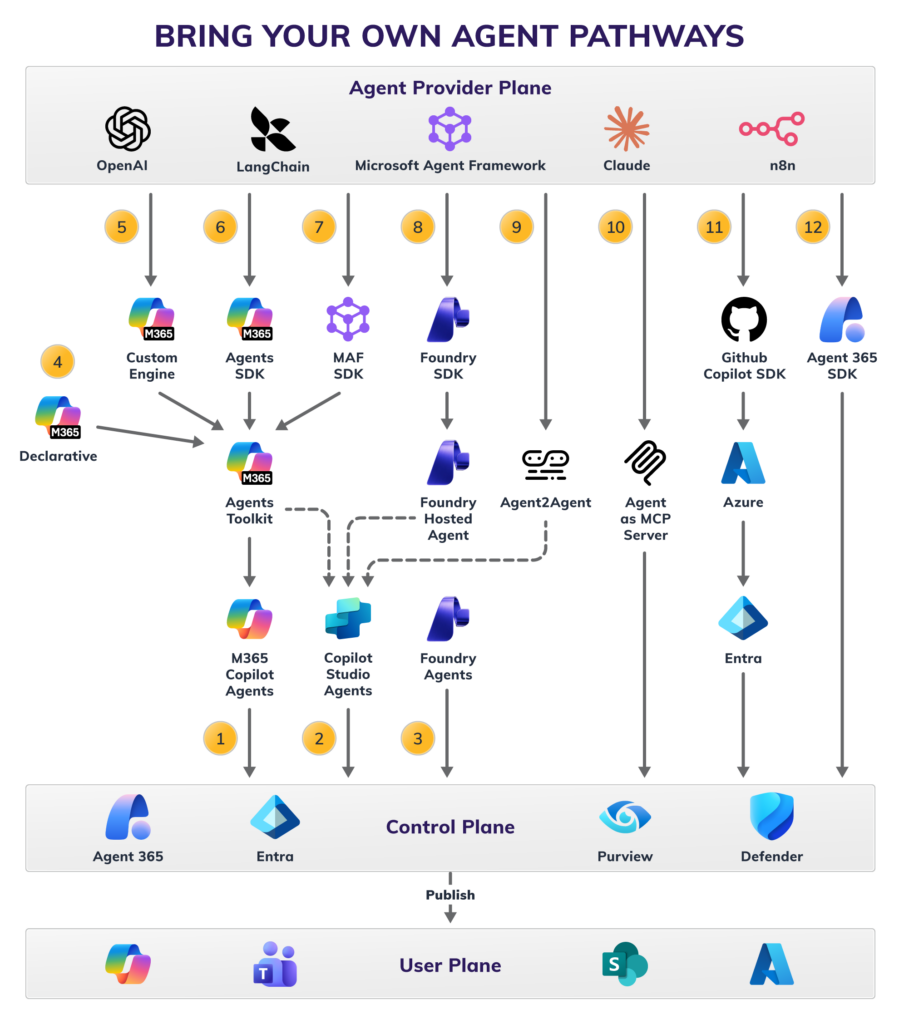
The 12 BYOA pathways.
Before diving into the pathways themselves, it helps to understand the three-plane framework that organizes them, listed from the top to the bottom:
The 12 pathways are different routes from the provider plane, through or alongside the control plane, and up to the user plane. Knowing which destination you’re aiming for — and how much control you need along the way — will help you choose the right pathway instead of spending weeks on the wrong one.
One more note before we walk through the pathways: Some of the referenced features are still in preview. Always fact-check availability against current Microsoft documentation, and treat any specific feature names with the understanding that they may have been renamed or reorganized by the time you’re evaluating them.
For convenience, I’ve organized the pathways into clusters of similar, but not identical, pathway types.
The first three pathways are M365 Copilot agent, Copilot Studio agent, and Foundry agent. These are native tools for building inside the Microsoft technology stack. They’re not strictly BYOA pathways, but because all three offer no-code tools, you can simply paste outside agents’ instructions into them, and you’re up and running.
From there, you can begin connecting them to M365 apps, knowledge sources, off-the-shelf connectors, and MCP tools. They all offer model choices, so you could bring your Claude instructions to them, for example.
The M365 Copilot agent is an agent builder incorporated into M365 Copilot that lets anyone create and deploy a basic agent without writing a line of code. Think of it as the on-ramp for citizen developers. It’s well-suited for productivity use cases grounded in Work IQ knowledge sources like Teams, Outlook, SharePoint, or other M365 data in Microsoft Graph. You can bring your own instructions and upload your own knowledge sources to have your agent live in minutes, not days or weeks.
The Copilot Studio agent is a step up in sophistication. Agents built here can connect to a broader range of tools, including hundreds of available connectors and MCP servers. They can also delegate work to more specialized agents, such as Foundry agents, Fabric data agents, or any other agent.
The Foundry Agent Service is a no-code tool for building, deploying and observing agents on Azure. You have full access to the code too. (This pathway is not to be confused with using hosted agents in the Foundry Agent Service, which we cover in more detail in Pathway 8.
Microsoft Foundry offers access to more than 11,000 models, compared to the handful available in Copilot Studio, along with full control over agent logic, tools, and memory. Foundry is a proven, scalable platform that predates LLMs by several years, so the infrastructure underneath it is mature, even as the agent capabilities on top are still evolving.
Pathways 4 through 7 run through the M365 Agents Toolkit, a Visual Studio Code extension that provisions and deploys agents directly into Copilot or Teams. If your organization’s development work happens across the Microsoft development stack, this cluster is worth exploring.
These pathways aren’t inherently more complex than the Foundry path. They’re just a different destination with a different tool set.
The declarative agent is the most straightforward of the four. You define agent behavior in a structured, declarative format and deploy it as a M365 Copilot agent through the toolkit. In fact, this agent is the pro-code equivalent of a no-code agent built in Copilot. It’s good for teams that want code-level control and GitHub or Azure DevOps options for deployment.
The custom engine agent is where outside agents enter the picture. You wrap a custom or third-party agent code, built in any framework, in a custom engine agent shell and deploy it through the toolkit. It’s a practical middle ground between fully Microsoft-native and fully custom agents.
The Agents SDK gives teams full-stack control over agent development. It supports bringing custom code and offers an SDK to create agents from scratch. Agents can be published to Copilot, Teams, and other channels through the toolkit. This offers more flexibility and more developer overhead.
The Microsoft Agent Framework SDK (MAF SDK) is geared toward multi-agent workflows. If you have agents built in different frameworks doing different jobs, MAF SDK lets you compose them into a coordinated flow and deploy the whole thing through the toolkit. It’s the right tool if you’re orchestrating several agents together.
This pathway is worth spending the most time on because we recommend that most pro-code teams start here when you’re bringing a custom agent into Microsoft for the first time.
The Foundry hosted agent pathway works like this: You build your agent using whichever framework you prefer. Then, you use the Foundry SDK in Visual Studio Code to automatically containerize, package, and deploy it to Microsoft Foundry as a hosted agent. Foundry handles the hosting, scaling, and Azure cloud infrastructure. You get your agent, running as you built it, inside Microsoft’s platform.
What makes this pathway practical is the automation the SDK tools provide for provisioning and deployment and the connected agents option. Once your agent is hosted in Foundry, you can connect it to a Copilot Studio agent, making Copilot the user-facing interface while your custom agent does the specialized tasks on the server side. Copilot becomes the user interface (UI) while your agent does the work behind the scenes.
This architecture makes multi-agent use cases possible, such as when a Copilot Studio agent needs to delegate specialized work to one or more back-end agents. As a Microsoft Copilot Ready Tier partner, we deploy this pattern with enterprise clients, including work combining Copilot Studio front ends with Foundry hosted agents.
For this path, you’ll need Python developers familiar with the Foundry SDK, an active Azure subscription, and a Foundry project set up and ready to receive deployments. Azure handles cloud scalability automatically, and governance connects through the Agent 365 control plane, the same as any other pathway.
Pathways 9 and 10 require the most AI maturity to implement but offer the greatest openness and flexibility in return because they rely on open-source, standards-based protocols rather than Microsoft-specific tooling.
This pathway uses Google’s open Agent2Agent (A2A) protocol, a cross-platform standard that allows agents to communicate with each other regardless of where they’re built or hosted.
Microsoft has added A2A support inside Copilot Studio, meaning you can register an A2A-compliant agent and connect it to a Copilot Studio agent without sharing any underlying code or infrastructure. It’s the most platform-agnostic option in the ecosystem and the most forward-looking. However, it’s also the least mature. If you believe cross-platform agent interoperability will become the dominant standard, this pathway is worth watching.
The agent as Model Context Protocol (MCP) server takes a tool-oriented approach. Rather than surfacing your agent as a conversational interface, you expose it as an MCP server that other agents can call as a tool. It’s best suited for agents that perform discrete, well-defined functions and need to be callable from within a broader agent workflow rather than deployed as a standalone experience.
Where the protocol paths in Cluster 4 prioritize openness and cross-platform interoperability, the two pathways in Cluster 5 prioritize control. These are fully custom builds for teams that need to own every layer of the experience from agent logic to the end-user UI. They require the most developer investment of any pathway, but they impose the fewest constraints.
The GitHub Copilot SDK path is the full custom web app route. You build an agent using the GitHub Copilot SDK, deploy it to Azure, connect it to Entra for identity management, and publish it as a custom web application. With maximum flexibility and maximum overhead, this is the pathway for teams that need complete control over the end-user experience.
The Microsoft Agent 365 SDK allows you to use the Microsoft Agent 365 CLI to directly register your custom agent provider into the control plane to gain Entra identity, Purview governance, and Defender protection. If your primary goal is bringing an outside agent under Microsoft’s security and governance umbrella, this is the path.
Microsoft Agent 365 SDK is in preview, but it is the future that spans many of these pathways, and in many cases, it may replace the others to some extent.
With the full BYOA landscape mapped, the next question is practical: Given your team, environment, and timeline, which pathway is right for you?
Knowing about all 12 BYOA pathways is useful, but to move your project forward, you must decide which one best fits your situation. The right choice comes down to four questions:
1. Where is your agent being built?
2. What’s your team’s development capability?
3. Where do your users need to access the agent?
4. Do you need a single agent or a multi-agent architecture?
A simplified reference guide.
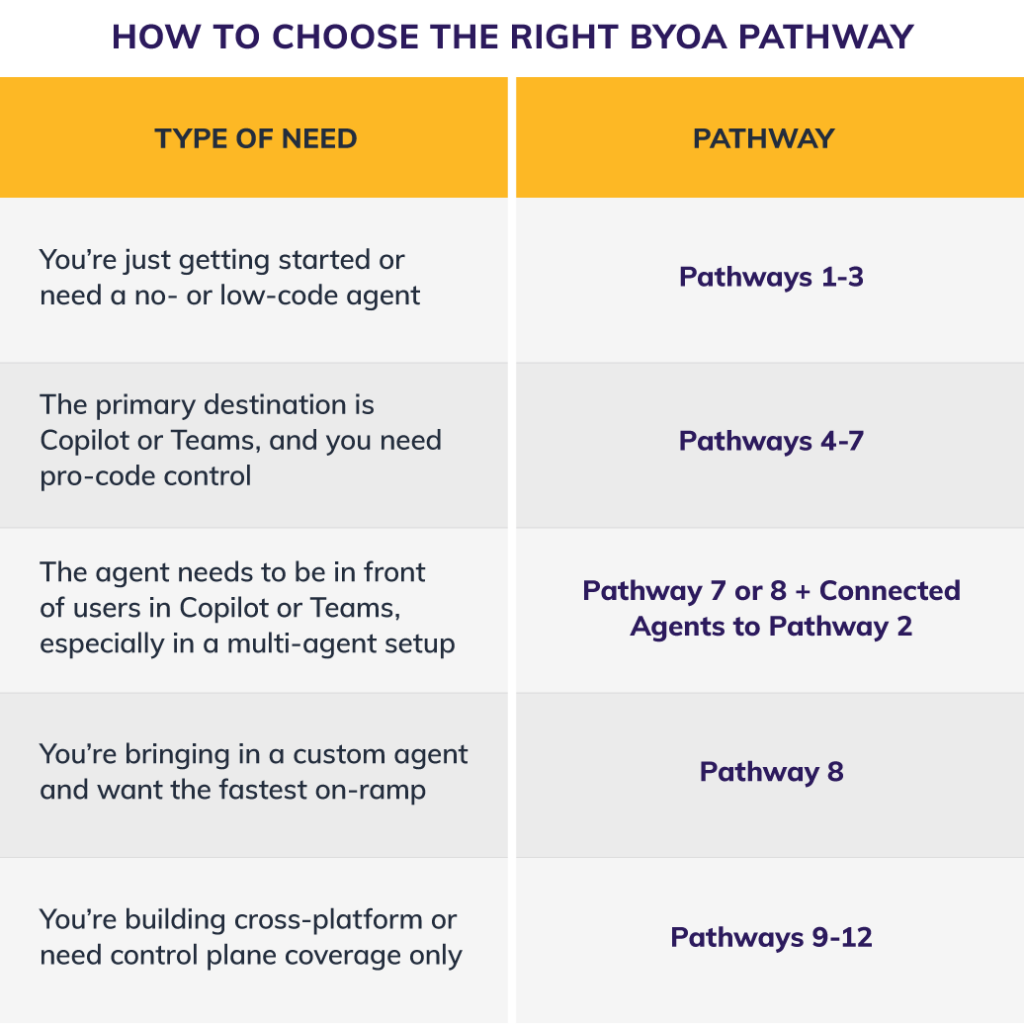
A simplified reference guide for choosing the right Microsoft agent framework.
This landscape is moving fast. Several of these pathways are still in preview, Agent 365 SDK is a recent arrival, and Microsoft’s extensibility model is expanding on a near-monthly basis.
Gartner’s Senior Director Analyst Anushree Verma captures the trajectory well: She says that as agentic AI matures, “standardized protocols and frameworks will enable seamless interoperability, allowing agents to sense their environments, orchestrate projects, and support a wide range of business scenarios.”
However, as Centric Consulting AI Strategy Director Joseph Ours says, “You have to be in the habit of being ready to pivot products when new capabilities come out that warrant it. In a field where things double in capability every four to six months, you should always look for what’s best of class.”
The pathway that’s right for your team today may look different in six months, which is exactly why starting with the lowest-friction option and building from there is the safer strategic bet.
The BYOA landscape is more mature than most teams realize, and for the Microsoft technology stack specifically, it’s expanding quickly. Whether you’re looking to surface a custom agent in Copilot, bring an outside framework under Microsoft’s governance umbrella, or connect your agents across the Microsoft development stack, there’s a pathway for it, and you don’t have to rebuild what you’ve already created to get there.
Ready to bring your own agents into the Microsoft tech stack? Our AI Agent Development and Microsoft Copilot Consulting experts can help you assess which pathway fits your environment and get you moving.
We also offer an AI Agents BYOA Workshop, where we teach how to do all 12 Pathways. Talk to an expert.