
Flip the Script on Retention With Customer Churn Prediction
Come with us as we walk through a journey of evaluating workflows and introducing a data solution to improve customer retention rates.

IT and security leaders who own the Microsoft 365 tenant: CIOs, CTOs, CISOs, and the Microsoft 365 and modern work owners who will run the assessment and remediate what it finds.
Many enterprise AI programs do not stall on model choice or budget. They stall because the tenant is unprepared for what Copilot and agents can reach. Copilot exposes permissions and governance debt faster than teams can remediate it.
The data supports that pattern. In IBM’s “2025 Cost of a Data Breach Report,” 13 percent of organizations reported breaches involving AI models or applications. Of those, 97 percent lacked proper AI access controls; 63 percent had no AI governance policy or were still building one.
The pattern looks the same from the inside. Copilot goes live, adoption stays flat, and sometimes someone surfaces a document they were never meant to see. The issue is rarely a lack of tools — it’s the gap between owned controls and AI-ready controls.
Copilot readiness starts with what the assistant can reach, like permissions, sensitivity, lifecycle, auditability, and policy enforcement. Agent 365 readiness adds a different control plane: agent identity, ownership, registry, lifecycle, and observability.
That is the work of readiness.
This is the first of four deep dives into the steps needed to scale enterprise AI with Copilot and Agent 365 governance. Step One is an honest look at where your tenant is.
Readiness does not mean eliminating every risk before a pilot. It means knowing what Copilot and agents can reach, which gaps matter most, who owns remediation, and which risks are temporarily accepted with an owner and closure date.
Governance has a branding problem. Many leaders picture policies, committees, and reviews. But the governance that matters here is posture work, like tenant configuration, data controls, security signals, and clear ownership.
The first gap most organizations run into is data posture. “Most of the calls I get start after something has already surfaced. Someone found a document they should not have seen and shared it with the person in the next cube,” says Veenus Maximiuk, principal architect and Microsoft compliance capability lead for Centric Consulting’s Microsoft Cloud Platforms Practice. “By then, you cannot pull it back. Readiness is the work you do before that call.”
Copilot operates within existing permissions, which means stale shares, open OneDrive folders, and unclassified, sensitive documents become easier to discover. Copilot does not create the exposure; it lowers the effort required to find, summarize, and act on content a user can already access. According to Gartner research reported by Computerworld, many Microsoft 365 Copilot rollouts remained in pilot because of data security, governance, and ROI concerns.
Agents can use delegated access, an agent user account, or their own application or agent identity. Regardless of model, each production agent needs an accountable sponsor, documented purpose, scoped access, and registry entry. Without those basics, you can’t answer what an agent touches or who’s accountable when something goes wrong.
Agent 365 makes those requirements enforceable. The registry gives you a single inventory of the agents running in your environment, and lifecycle management ties each one to an owner and a retirement decision.
Discovery matters most for the agents nobody registered, which is where the cost concentrates: IBM’s “Cost of a Data Breach Report” found that breaches involving high levels of unsanctioned shadow AI carried about $670,000 in added cost. Coverage depends on how an agent is built and integrated, so be sure to confirm what applies to yours.
A readiness assessment has a defined order, and it exists because each step constrains the next. Confirm licensing before scoping controls. Understand permissions before writing policy. Know your data before deciding what agents can reach.
Run these four areas against your tenant. The output is not just a gap list; it’s evidence for remediation priority, licensing decisions, and pilot readiness.
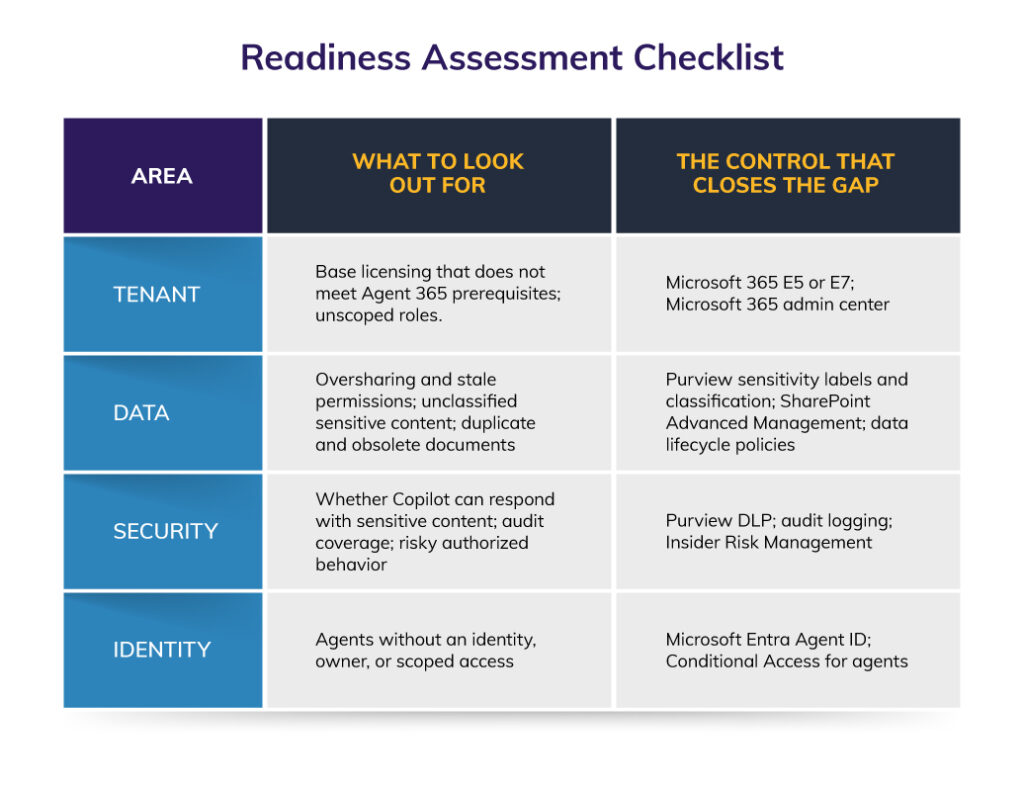
Readiness Assessment Checklist table showing four areas — Tenant, Data, Security, Identity — each with risks to watch for and the Microsoft control that addresses it.
Licensing comes first because it determines which controls are available. For enterprise information workers, standalone Agent 365 generally requires Microsoft 365 E5. Microsoft also identifies qualifying paths through the combined Defender and Purview suites, with separate prerequisites for frontline, SMB, and education customers. E3 plus Copilot alone does not qualify.
Permissions come next. Organizations often believe oversharing is managed until assessment reports show otherwise.
“A client told us they had no oversharing problem. In one client assessment, reporting identified a significant volume of content shared more broadly than intended,” says Veenus.
Data lifecycle belongs in this stage, too, and it’s the one most organizations skip. If five versions of an annually updated pricing sheet remain accessible, Copilot may use an outdated or nonauthoritative source unless the organization clearly manages authoritative content, obsolete files, metadata, and lifecycle controls.
Microsoft Purview allows you to:
These controls govern access, but authorized access can still be misused. A departing employee could ask Copilot to assemble everything they’ve touched without violating a label or policy. Catching that pattern means monitoring behavior rather than permissions, and plenty of organizations decide they’re not ready for it. That’s a defensible call, but it should be a decision, not an oversight.
Every agent needs an identity, an accountable owner, and access scoped to what it does. Microsoft Entra Agent ID provides that identity layer, including agent identity blueprints. It also distinguishes between agents acting on behalf of a user and agents operating with their own access. Conditional Access policies can govern agent-related access, but targeting depends on the access model. Delegated flows are evaluated against the user, application-only flows against the agent identity, and agent-user flows against the agent’s user account.
Conditional Access applies only when the target resource is protected through Microsoft Entra ID token issuance. Some agent controls also remain in preview or are license-dependent/tenant-dependent as of this writing.
Treat agent identity the way you treat employee identity, and the assessment questions write themselves. Which agents have a named owner still employed at your company? Which have permissions nobody has reviewed since they were built?
Offboarding is where this bites hardest. When an owner leaves, the related agent may become orphaned, stop functioning, or continue operating through various ways, from independent credentials to shared connections to autonomous identities. Readiness should therefore include:
Once you have your list, turn it into a sequence of decisions. Agent identity and ownership gaps shape how broad the first pilot can be. Licensing determines which controls are available now and which require investment. If you’re wondering whether any of this means buying a new governance platform, the answer is usually “no.”
For Microsoft 365-based organizations, most of the governance estate is already in place without standing up a parallel system alongside your current security tools. Purview, Defender, and Entra provide the foundation for data protection, threat detection, and access control.
To compensate for the agent-specific work those tools do not provide on their own, add Agent 365. It covers agent governance, registry, observability, security and compliance integration, and lifecycle management. So, the answer to the platform question is not a parallel system. It’s an agent control plane that extends the Microsoft controls you already run.
Get the product pairing right. Agent 365 and Microsoft Entra Agent ID are two products, not one: Agent 365 governs the agent control plane, and Entra Agent ID establishes who the agent is, providing identities and blueprints that the readiness work depends on.
However, not all of this behaves like traditional user governance. Agent access patterns, conditional access signals, and enforcement options all differ from human sign-ins.
Several Defender, Purview, and Entra agent capabilities also remain in preview or are license-gated/tenant dependent, so confirm your current status against your own tenant rather than relying only on marketing pages. Our Microsoft and Office 365 security and compliance work often starts by finding capabilities we already own and never turned on.
Know when the thesis breaks. For some estates, “extend what you run” is the wrong answer, and it’s worth knowing whether yours is one of those cases.
For example, if you’re running E3 with no path to E5, the prerequisite alone changes the conversation. If most of your agents live on non-Microsoft platforms, Agent 365 gives you registry visibility but not the same depth of control. And if your permissions and classification debt are large enough, remediating it becomes its own program (with its own budget) ahead of anything agent related.
Knowing which situation you’re in is itself a readiness finding, because the findings matter once they’re sequenced into a plan and a licensing decision. That’s where readiness turns into something a program can act on.
A readiness assessment should produce two decisions: which licensing path makes the required controls available and what gaps must be remediated first.
Before you scope agent controls, settle the licensing question. Agent 365 is licensed per user — whether purchased through Microsoft 365 E7 or as a standalone offering — and agents themselves don’t need separate licenses. The prerequisite question is the one that stalls scoping most often, so settle it early. There are three paths.
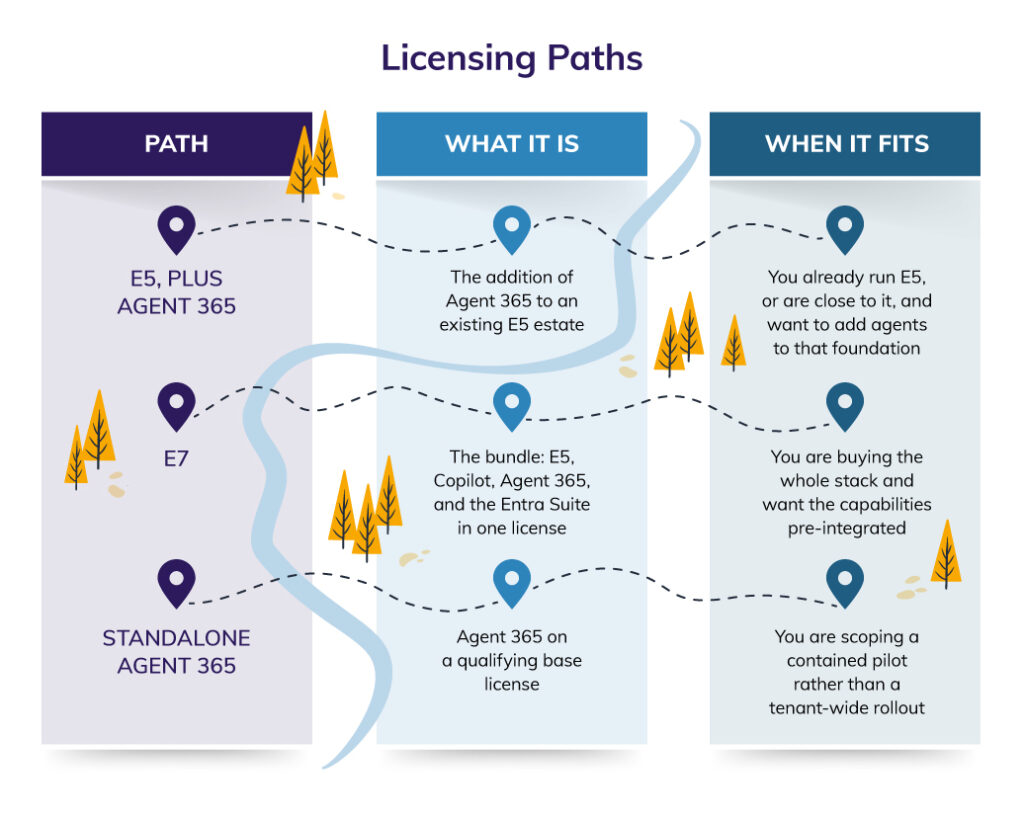
Three licensing paths to Agent 365 — E5 Plus Agent 365, E7, and Standalone — and which one fits depending on your existing Microsoft estate and rollout goals.
The practical decision is simple. If you already run E5, evaluate Agent 365 as an add-on for users who interact with, manage, own, or sponsor agents. If you’re moving toward the full Copilot and agent stack, E7 may be the cleaner licensing path. If your estate is E3 plus Copilot, the prerequisite gap becomes the first readiness item because the required Agent 365 capabilities are not available on that foundation.
Sequence the gap list by risk, not by ease. For example, the risk of Copilot oversharing trumps deploying a new agent just because you can. A remediation plan that leads with the cheap fixes rather than the exposed vulnerabilities looks productive but leaves the real risk in place.
Risk sets the order, but value sets the direction. Following that mantra helps identify the high-value scenarios you’re preparing for, the work an agent would take on, and the outcome that would justify the investment. You don’t have to select a pilot yet. Readiness only needs enough of the business case to direct the technical work. Remediating the data estate behind a scenario nobody wants is how programs spend budget without proving value.
The plan also fixes what “ready” means before anyone can move the goalposts. Readiness is a business decision as much as a technical one, and a team may choose to deploy before every gap is closed (e.g., a deadline, a budget cycle, or a business unit that cannot wait).
That can be the right call. What makes it defensible is naming and documenting the risk you’re accepting and the date you’ll close it. An accepted risk with an owner and a deadline is a decision. The same risk left unnamed is exposure you haven’t noticed yet.
Together, the licensing path and remediation sequence carry you from readiness to deployment. The next step is selecting a high-value scenario and activating it in a controlled pilot, which is where this series goes next.
If Copilot is already live, the next decision is not whether AI governance matters, but whether your tenant is ready for what Copilot and agents can reach at scale. A good readiness plan makes that decision visible: the gaps that matter most, the licensing path that supports the controls, the risks accepted temporarily, and the scenarios worth moving into a controlled pilot.
If you’re early on this journey and want to see where your tenant stands, start with our AI Readiness Self-Assessment to establish a baseline. If you’re closer to deployment, our Microsoft Copilot Consulting and AI Governance Consulting teams can help validate the gaps, sequence remediation, and build a plan your program can act on.
For a walkthrough, watch our on-demand webinar, Microsoft Agent 365: The Executive’s Guide to AI Governance, and reach out when it’s time to turn readiness findings into a governed Copilot and Agent 365 roadmap.