
Get Ready for Your Microsoft Copilot Rollout: Strategy, Data, and People
We help you think strategically about your Microsoft Copilot rollout so you can invest in the tools that will unlock the most value.

IT leaders and Microsoft 365 administrators at midsize to large enterprises who are already deploying AI agents — or watching their user base start deploying them — and need a governance model before the volume becomes unmanageable.
AI agents are no longer a future-state conversation. According to the Wall Street Journal, Gartner estimates that within the next two years, about 150,000 agents will be running inside an average global Fortune 500 enterprise. That growth is already playing out in organizations using Microsoft 365, where tools like Copilot Studio and Agent Builder put agent creation within reach of a much wider user population than most IT leaders anticipated.
However, Corporate Vice President of Microsoft Security Vasu Jakkal says, “As AI adoption accelerates, so does the need for comprehensive and continuous visibility into AI risks across your environment — from agents to AI apps and services.”
That’s because when agents are built without clear ownership, access policies, or life cycle controls, security gaps widen, data quality erodes, and costs accumulate in ways that don’t show up until they’re already significant. Gartner’s research backs this up: Despite the AI agent boom, only 13 percent of organizations have proper AI agent governance in place.
Waiting to govern until the problems are visible means the problems are already large. The organizations that get governance right are the ones that treat it as a design decision made before agents scale instead of a cleanup project after they’re already deployed.
This blog post walks through nine best practices for governing AI agents in Microsoft 365, including access controls, development strategy, cost management, sharing policies, and the visibility infrastructure that ties it all together.
Before you configure anything, answer the questions that will drive every downstream decision:
The answers to these questions are the architecture of your AI agent governance model.
“Effective governance enables organizations to proactively manage regulatory requirements, build trust with stakeholders, and foster responsible innovation across AI systems rather than merely reacting to threats,” says Joseph Ours, Centric Consulting’s director of AI strategy.
When organizations move forward without asking those questions, they end up configuring controls that don’t align with actual business needs. One best practice is to establish a clear governance owner, whether that’s a center of excellence (CoE), an IT steering committee, or a designated Microsoft 365 administrator.
Then, document your answers before you start configuring because the policies that follow — for example, those regarding citizen developers — are only as durable as the decisions behind them.
Citizen developers, the non-IT users who build their own agents and automations, are already inside your environment. Restricting them entirely isn’t realistic, and that shouldn’t be your goal. Your goal is a tiered model that matches the level of governance to the level of risk.
A practical three-zone model looks like this:
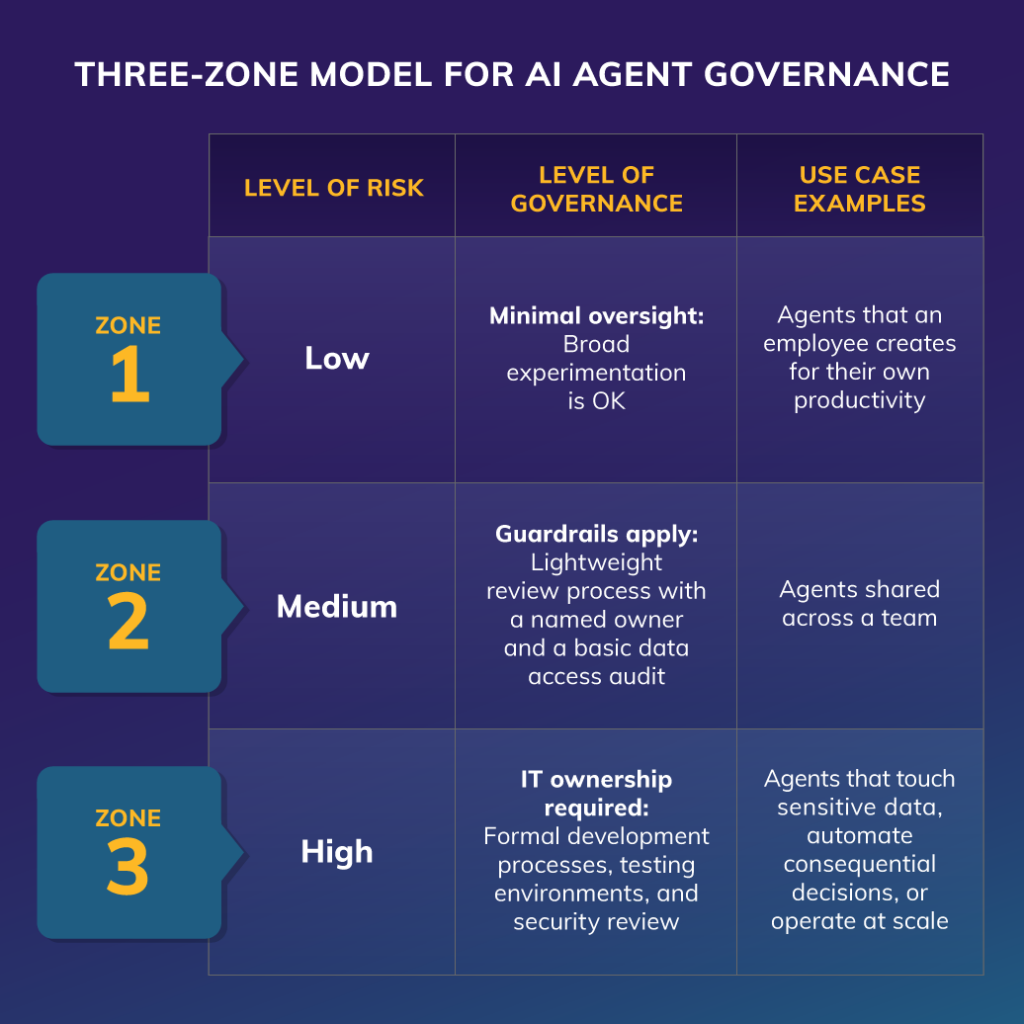
A three-zone model for AI agent governance.
The mistake most organizations make is treating all citizen development as Zone 3, which can contribute to shadow AI as users find unsanctioned ways to solve their problems. A tiered model keeps innovation visible and governable.
Define the zones, communicate them clearly, and enforce them through access controls rather than policy alone.
Copilot Studio, the default agent-building platform in most Microsoft 365 environments, is a great tool for controlling access to agent production.
Restricting Copilot Studio access to defined security groups means you know who is building advanced agents, and you have a process for bringing new builders in. Simpler tools, such as Agent Builder, can remain more broadly available, supporting the Zone 1 and Zone 2 use cases described above.
Access control is about knowing your surface area, not gatekeeping. When you know who is building agents, you can support them effectively, catch problems early, and scale oversight as usage grows. When access is open without visibility, you’re managing the results of decisions you didn’t make.
Review the default settings for Copilot Studio in your tenant today. For many organizations, tightening access is a one-hour configuration change that meaningfully reduces governance risk.
Agent usage in Microsoft 365 consumes credits, and consumption varies significantly based on which features agents use. Autonomous agents, for example, are substantially more resource intensive than basic query-response agents.
A cost governance strategy has three components:
Cost governance is easiest to implement before usage is high. Retrofitting budget controls onto an environment where agents are already running at scale is significantly more disruptive than building the controls in from the start.
For business-critical, high-stakes, or widely deployed agents that cross the Zone 3 threshold, an informal development process is not sufficient. Application life cycle management (ALM) brings structure to how agents are built, tested, and promoted to production.
A standard three-stage model maps cleanly to Microsoft Power Platform environments:
ALM is what separates an agent you deployed from an agent you can maintain. Without ALM, version control breaks down, rollbacks become manual and risky, and the provenance of any given agent version is unclear.
Power Platform pipelines natively support this structure. If your organization is already using them for Power Apps or Power Automate, extending them to agents is straightforward.
By default, agents in Microsoft 365 can be shared broadly, including through links that extend access to anyone in the organization. That default is appropriate for a few use cases, but it’s not appropriate for most.
Establish sharing policies that match your governance zones:
Sharing agents is OK. The risk comes when agents get shared with people who don’t understand what data the agent accesses, what actions it can take, or who is accountable for its behavior. Clear sharing policies make that accountability explicit.
Disable broad “anyone in the organization” sharing options for Copilot Studio agents and replace them with group-based distribution that aligns with your governance zones.
Third-party tools increasingly include their own agents that have access to your data and infrastructure if you let them.
Microsoft Agent 365 allows administrators to inventory all agents operating in an environment, including custom, Microsoft-native, and third-party agents. From that inventory, you can block specific third-party agents, set usage policies, and apply security controls analogous to those you’d apply to user identities.
Treat third-party agents as a governance category instead of an exception.
The risk surface of an agent you didn’t build and don’t control is meaningfully different from the risk surface of an agent you built internally. That difference should be reflected in how you evaluate, allow, and monitor them.
Build third-party agent review into your standard vendor evaluation process. Before any third-party agent is allowed to operate in your environment, it should go through the same data access and security review you’d apply to any other vendor integration.
You cannot govern what you cannot see. That principle applies to agents as directly as it applies to any other IT asset.
Agent 365 provides a centralized registry that inventories all agents operating in your environment, whether they’re custom, Microsoft-native, or third-party. From that registry, administrators can monitor usage, track distribution, and assess risk and compliance across the full agent population.
Without centralized visibility, governance is reactive. You find out about a problematic agent after a security incident, after someone notices unexpected credit consumption, or after a data access question surfaces in a compliance review. With centralized visibility, you have the situational awareness to identify issues before they become incidents.
Build the agent registry review into your regular IT governance cadence. Agent populations can grow quickly, and a monthly review of what’s running, who owns it, and how it’s being used is a low-cost way to stay ahead of risk.
Governance programs fail when the people they govern see them as obstacles rather than infrastructure. If your AI agent governance framework is perceived as blocking rather than enabling agent use, users will route around it with shadow IT.
The most durable governance models are the ones that communicate their purpose clearly. Effective governance is the infrastructure that makes innovation sustainable. Organizations that define clear policies, empower the right users through a tiered development model, and maintain visibility across their agent population are consistently better positioned to scale AI use than organizations that either lock everything down or let everything run unchecked.
Publish your governance framework, make it accessible, and treat it as a living document that evolves as your agent population grows. Your framework should clarify what’s running, who owns it, and what to do when something goes wrong.
AI agents are changing how work gets done. That change is happening fast, and it’s happening inside your Microsoft 365 environment whether you have a governance framework in place or not.
The organizations that come out ahead are the ones that treat governance as an early investment rather than a late response. Access controls, development tiers, cost monitoring, sharing policies, third-party reviews, and centralized visibility — none of these are difficult to implement at the outset, but they all become significantly harder to retrofit after agent sprawl has taken hold.
Start with the governance foundations. Get visibility in place. Define who builds what and what oversight applies at each level. That foundation is what makes everything else — the innovation, the scale, the business value — possible to sustain.
Our Microsoft 365 and AI teams work with organizations at every stage of agent adoption, from governance foundations to enterprise-scale deployments.