
Supply Chain Expert Explains Why AI Pilots Stall at the Second Plant in Industry Today
Scaling AI pilots across manufacturing plants? Rob Williams explains in Industry Today why first-site wins stall and why the data model must come first.

IT and security leaders at midmarket organizations who have moved AI agents from pilot into (or toward) production and need a practical governance framework that works within their existing Microsoft 365 environment.
Picture a new hire who started last Monday with no manager, no access request, and no controls keeping them from reaching every file in your environment. You would flag that employee as a security risk on day one, and the employee would not make it to day two.
Unfortunately, that’s how many AI agents on your Microsoft 365 (M365) platform show up to work, but they will likely go unnoticed. Your teams may have built these AI agents in Microsoft Copilot Studio, brought them in from third-party vendors, or spun them up without ever filing an IT ticket. Each agent can act on its own, reach company data, and, in some cases, spend money.
This blog post covers why ungoverned agents create the same risk patterns as shadow IT, why that risk stalls pilots, how the four steps of standard employee onboarding map to agent controls already in your M365 environment, and why the timing of governing your agents matters more than most leaders realize.
Ungoverned AI agents are a new version of an old type of risk: shadow IT. These shadow digital assets have credentials, access, and the ability to act without a human in the loop.
The first problem ungoverned agents present is visibility. You can’t govern what you can’t see. Most organizations that have moved beyond early AI pilots have no clean inventory of the agents already running in their environment. Without that baseline, every governance decision is guesswork, and the gap between what leadership thinks is running and what is actually running widens quickly as adoption accelerates.
In our work helping midmarket organizations move from Microsoft Copilot pilots to governed production, the same gap emerges: No one can produce a clean list of the AI agents that are already live. Microsoft Agent 365 now does that discovery work for you, making it an essential tool for organizations trying to close this gap.
The second problem is exposure. An agent runs with an identity, a set of permissions, and access to data — the same traits that make any insider account risky when no one is watching. A poorly scoped agent can reach systems it was never meant to touch and run up spend nobody approved.
Simply put: Without a strong governance foundation, your AI agent pilots will stall or fail because of the risks they introduce.
Most organizations that moved early on AI agents are now stuck at the pilot stage. In fact, an MIT report found that 95 percent of AI pilots fail. The technology worked, but the route to production never existed because organizations started with the tech instead of the problem.
As Centric Consulting’s Director of AI Strategy Joe Ours explains: “A problem-first AI approach is crucial because when you design agents around vague goals, you hit scaling and governance problems.”
Here’s how those governance problems play out: Risk and compliance teams see the exposure, find no safe path from pilot to production, and freeze the pipeline. However, governance, not capability, was the blocker. Even if teams had simplified processes at the start and used RPA to automate repetitive tasks, their agents have nowhere to go because no one had built the AI agent governance foundation.
Then comes the question every executive asks eventually: What are we getting for this? Agents generate cost, performance, and outcome data continuously, but most teams do not capture AI agents’ ROI in a structured way. Without that telemetry, you cannot prove value or defend the next round of spend to scale up your AI agents.
Stalled pilots and unprovable ROI are two symptoms of the same missing governance layer. The good news? You already know all the steps to implement AI agent governance — and you already have the tools available in M365.
Read those problems back, and the fix becomes familiar. You solve the human version of it every working day when you onboard new (human) employees.
Onboarding an employee involves:
AI agents have the same requirements, and the controls to onboard agents already run in your Microsoft 365 environment:
These M365 controls are the same ones you already use to govern people, apps, and service accounts — just applied to agents.
Now that you know how to implement AI agent governance with Microsoft 365, let’s explore when you should onboard your AI agents.
Unlike employees, you can onboard agents before you “hire” them. If you do that when the fleet of agents is small, standing up your AI agent governance model will be straightforward. You’ll build an agent inventory as agents go live and scope their access from the start. The cost and risk will be predictable and contained, leading to faster, trusted pilots.
In contrast, if you add governance after you’ve launched the agents, you’ll be retrofitting identity, access, and monitoring onto a live fleet that already has access to sensitive data. By default, most M365 organizations drift toward retrofitting.
Here’s a breakdown of why the timing of when you implement AI agent governance matters.
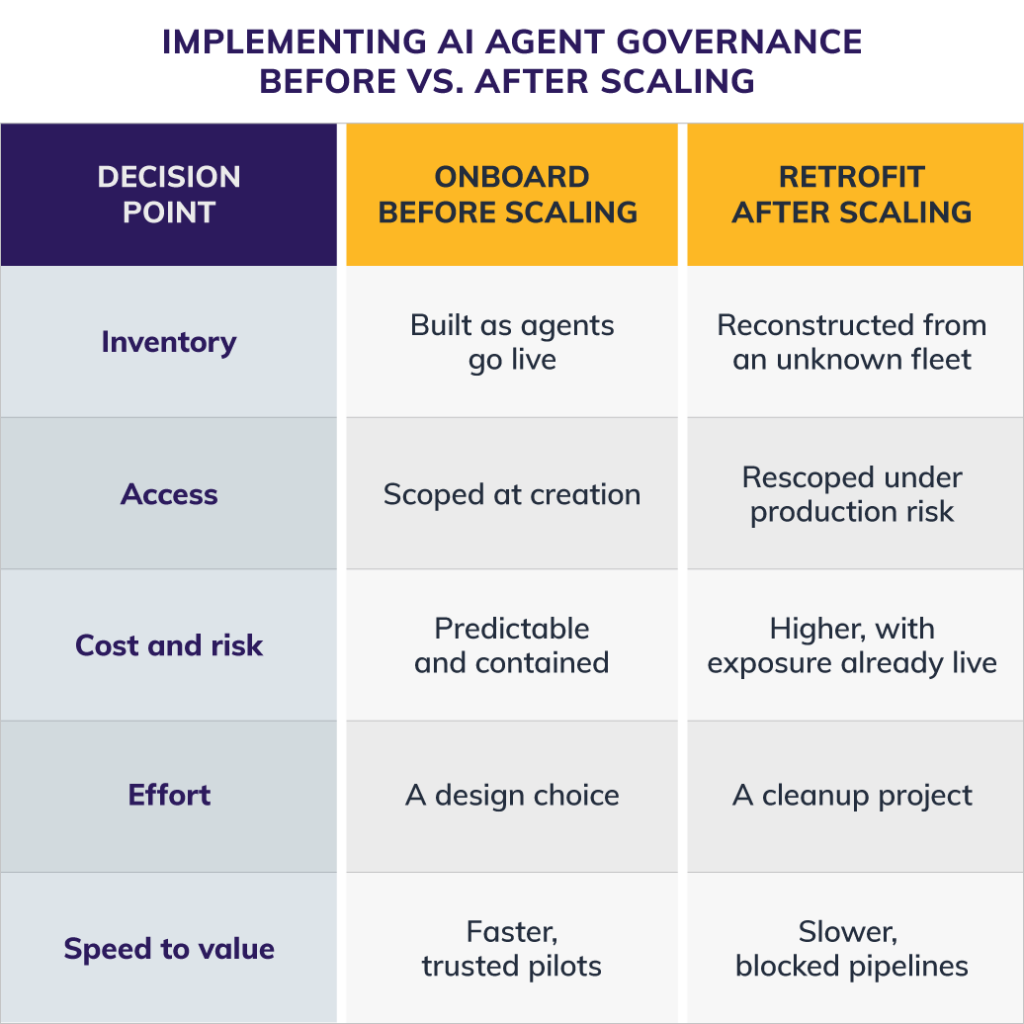
Two paths to AI agent governance. The difference is timing.
The window to onboard agents before scaling narrows as AI agent adoption accelerates. Organizations that governed early are moving from pilot to production because their risk and compliance teams have clear answers, while organizations that retrofit governance are running the harder, slower version of this work while their pipelines stay frozen.
Governing agents in an M365 environment before scaling them costs less and risks less than the retrofit most organizations are sliding toward. The core disciplines of onboarding AI agents are ones you already run for your people. Apply them to your newest workers before the fleet outgrows your ability to see it.
Our webinar walks through what that looks like with Microsoft Agent 365:
If your agents are already working but no one onboarded them, this session with our Microsoft consultants is for you.
Centric Consulting’s Microsoft Cloud practice helps midmarket organizations move from Copilot pilots to governed AI production by building the identity, registry, and monitoring foundations that let adoption scale without the cleanup project. If your agents are already running but your governance model is still catching up, talk to our Microsoft Cloud team.