Learn about the features of Cloud App Security, an Office 365 add-on that allows you to monitor and safeguard your information.
Cloud App Security is an add-on to the Office 365 and Azure security space, which is available with an EM+S E5 license, or for $5 per user per month as a standalone product. Or you can use a 60-day trial to prove it out.
Its real job is to manage and report on everything coming and going from Office 365 via your corporate network logs, azure logs, connectors for third party, shadow IT monitoring, as well as SharePoint, OneDrive and Exchange.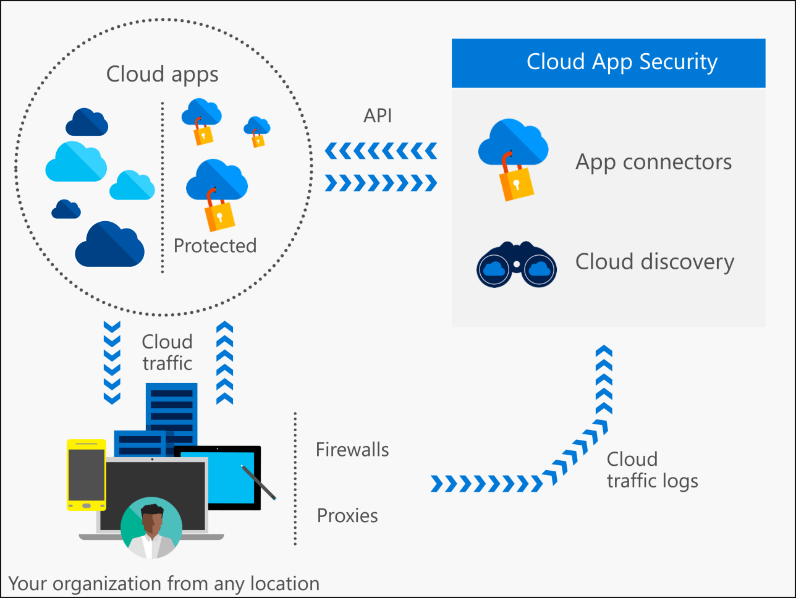 Unfortunately, I have only this blog to convey all of the goodness in this security feature. I could probably take three to get a good start, and maybe I will do that in the future. For now, I am listing the features below and will hit on some of those that might interest you most.
With Cloud App Security, you can import router logs from some of the most popular appliances: Barracuda, Check Point, Cisco and more. You can also import custom logs and logs in unknown formats. This will give you greater insight into bottlenecks and slow connections from your network, globally.
View live activity from your Office 365 tenant as it happens and verify which accounts and other apps have access to which resources.
Unfortunately, I have only this blog to convey all of the goodness in this security feature. I could probably take three to get a good start, and maybe I will do that in the future. For now, I am listing the features below and will hit on some of those that might interest you most.
With Cloud App Security, you can import router logs from some of the most popular appliances: Barracuda, Check Point, Cisco and more. You can also import custom logs and logs in unknown formats. This will give you greater insight into bottlenecks and slow connections from your network, globally.
View live activity from your Office 365 tenant as it happens and verify which accounts and other apps have access to which resources.
Cloud App Security Features
Learn more about Cloud App Security features below: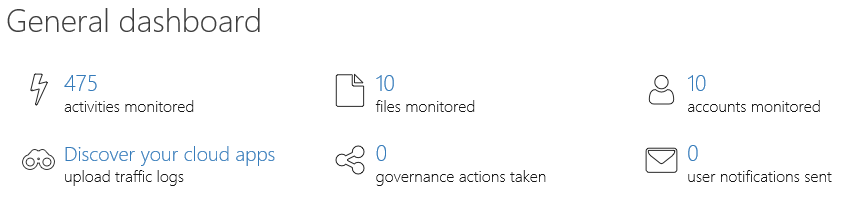
Discover
- Upload logs
- Anonymize Private information
Investigate
- Add apps including Office 365, SharePoint Online, OneDrive for Business
- Add Shadow IT apps like Amazon Web Services, Dropbox, G Suite, Okta, Salesforce and ServiceNow
- Explore the Azure logs, Files, and Accounts
- Report on Shared files and privileged users
- Create customized reports
- Manage permissions that apps have to Office 365 products
Control
- Create policies by type: Activity policy, Anomaly detection policy, App discovery policy, Cloud Discover anomaly detection policy, and File policy
- Create policies for risk categories: Access control, Cloud discovery, Compliance, Configuration control, DLP, Privileged accounts, Sharing control, and Threat detection
- Use pre-built templates
Alerts
- Set alerts by Resolution status, Risk Category, Severity, App and User